Academy
Add your bakery’s first products
Products · 1 of 2
Hide playlist
Sign in
0:00
/ 2:57
1×
Prev
Next
Transcript
Tap a line to play from there
Click a line to play from there
0:02
Your shop is open. Now let's add what you make. A product is a template: its photos, what goes into it, and its allergens. Tap New product.
0:13
Start with a photo. Tap Add photos, then take one or pick one. The first photo is the cover.
0:21
Give it a name. We'll call this one Country Sourdough.
0:26
Add a short line under the name, up to a hundred characters. Customers see it on the product.
0:33
Under Details, say how it's sold: a single item or a pack, and how much it weighs. This one is 800 grams.
0:42
If customers can ask for it sliced, there is a switch for that too. We leave it off.
0:49
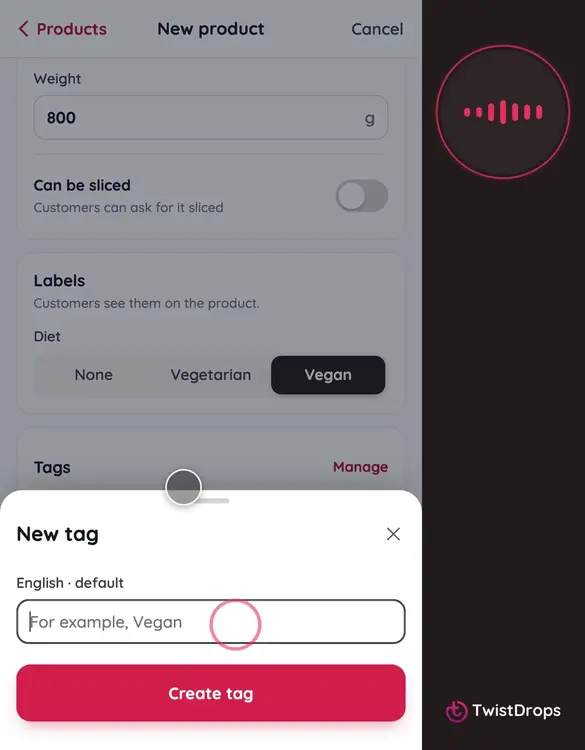
Labels show on the product. This one is vegan, so we pick Vegan.
0:54
Tags group your products. Tap New tag, type a name, and tap Create tag.
1:02
Now the allergens. Tap Declare allergens and choose Gluten. The law asks for the cereal by name, so choose Wheat. Then tap Done.
1:13
You won't find a price here. Price and stock belong to each drop, so you set them when you plan one.
1:21
Tap Create product.
1:23
Let's add two more, a little faster. Go back to your products, tap the plus, then New product.
1:30
The second is Butter Croissants. A photo, a name, a short line, and its label: vegetarian this time.
1:48
A new tag, and its allergens.
2:13
And the third, Cinnamon Buns. Its photo, its name, its line, and its details.
2:27
A tag, and its allergens.
2:44
Open the Products tab. Your three products are here, each with its photo.
2:50
That's your first products. Next, we'll put them in a drop, with a price and a stock.
Prev
Playlist
Next