Academy
Put a product on sale
Drops · 5 of 6
Hide playlist
Sign in
0:00
/ 1:15
1×
Prev
Next
Transcript
Tap a line to play from there
Click a line to play from there
0:00
Want to run a sale? Put a product on sale in one of your drops, and customers see the old price crossed out. We'll use next week's bake. Tap Scheduled, and then the drop.
0:11
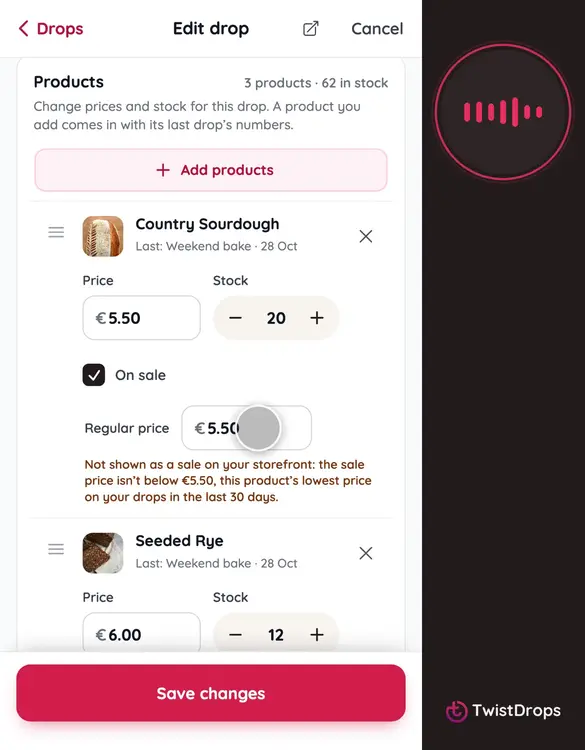
Scroll to the products, and under Country Sourdough, tick On sale.
0:16
Regular price fills in for you, with the lowest price this product had on your drops in the last 30 days. That's the number your storefront crosses out, because a reduction is measured from it.
0:28
Now lower the Price. This is the sale price: what customers pay.
0:34
Under the line, the form tells you what the storefront will show. If your price is not lower than that 30-day lowest, there is no sale to show, and the form says so.
0:45
Tap Save changes.
0:47
To see it as a customer does, tap View on storefront.
0:52
The old price is crossed out above the sale price, with the saving beside it.
0:58
Tap the little i, and the card explains it: the lowest price in the 30 days before the sale. You don't write that line. TwistDrops adds it for you.
1:08
Take the sale off whenever you like. A copy of the drop starts without it.
Prev
Playlist
Next