Academy
Ask customers for reviews
Customers and reviews · 3 of 4
Hide playlist
Sign in
0:00
/ 1:12
1×
Prev
Next
Transcript
Tap a line to play from there
Click a line to play from there
0:00
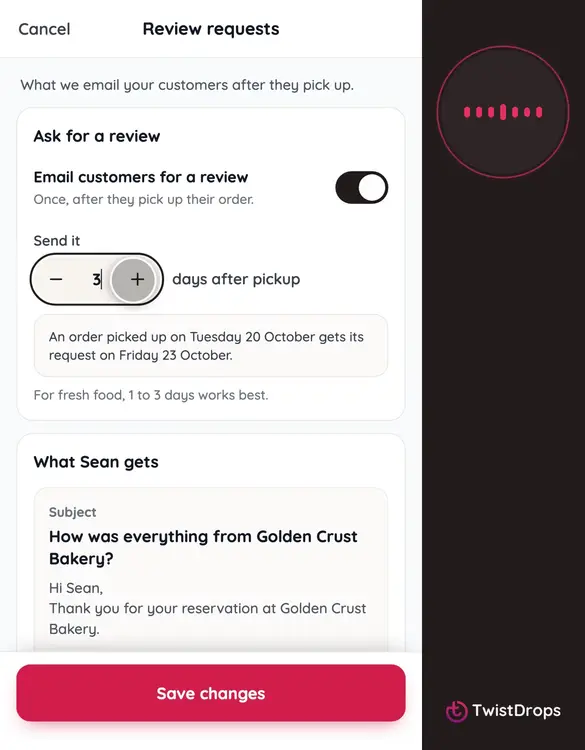
Reviews build trust, and customers rarely write one unless you ask. Open Menu, then Settings, and tap Review requests.
0:09
When this is on, every customer gets one email after they pick up their order, asking how it was.
0:16
Choose how soon: one to thirty days after pickup. For fresh food, one to three days works best.
0:24
The example shows exactly when it goes out. Below is the email your customers get.
0:30
Tap Save changes.
0:32
You can also ask by hand. On the Orders tab, open the drop your customer picked up from.
0:39
Open the order of a customer who picked up, and hasn't reviewed you yet.
0:45
At the bottom is the Review card. Tap Ask for a review.
0:50
Done. The customer gets the same email, with a link that works for seven days. You can ask up to three times, a day apart.
0:59
This is the email they receive.
1:04
Customers who have already reviewed your shop are never asked again, so nobody gets an email they shouldn't.
Prev
Playlist
Next