Academy
Your storefront
Your customers’ side · 1 of 9
Hide playlist
Sign in
0:00
/ 1:16
1×
Prev
Next
Transcript
Tap a line to play from there
Click a line to play from there
0:00
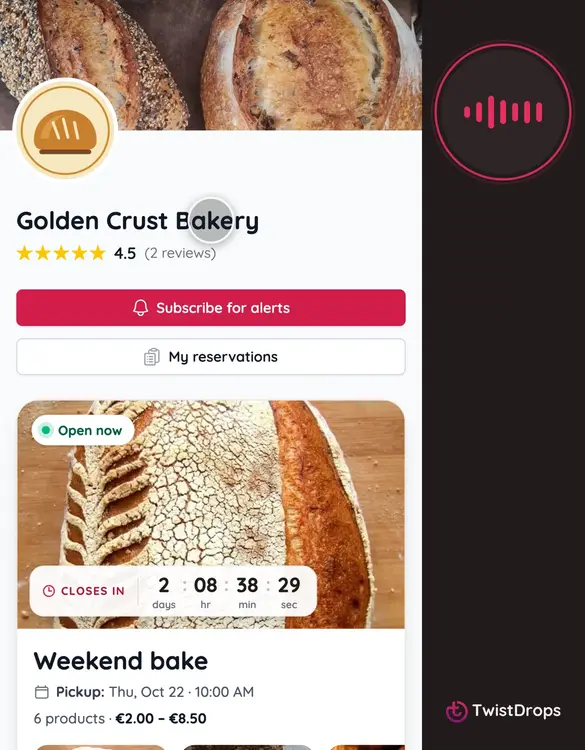
This is your storefront, the page your customers see. Everything on it comes from what you set up in the studio. This is how it looks on a customer's phone.
0:10
A first-time visitor is asked about cookies. Essential only keeps it to what the shop needs to work. They can change their answer any time, from the footer.
0:20
At the top, your cover photo, your logo and your name. Once customers have reviewed you, your rating shows under the name.
0:29
Two buttons: Subscribe for alerts, so customers hear about your new drops, and My reservations, where they find what they ordered.
0:38
Below, your open drop. A timer shows how long reservations stay open, and a strip of products shows what is in it. Reserve now opens the drop.
0:50
Further down, your story, your pickup point with a link to directions, and your social links.
0:56
Then your reviews, newest first, with your replies under them.
1:01
At the bottom, your terms, the privacy policy, and Cookie settings, where customers can change their answer.
1:09
That's what a customer sees first. In the next videos, we follow one reserving from it.
Prev
Playlist
Next