Academy
Open your pantry shop
Set up your shop · 1 of 6
Hide playlist
Sign in
0:00
/ 3:44
1×
Prev
Next
Transcript
Tap a line to play from there
Click a line to play from there
0:03
Welcome to TwistDrops. In this video you'll create your account, open your shop, tell customers your story, and see your storefront.
0:12
Start with your name.
0:16
Then your email address. It's what you'll sign in with.
0:22
Choose a password of at least six characters, and type it again to be sure.
0:29
Tap Create account. On the real site we first email you a link to confirm your address. In this video, that step is skipped.
0:38
Now your shop. First, choose what you sell. We'll pick Pantry. You can't change this later, so choose the one that fits. Then tap Continue.
0:50
Next, give your shop a name. Customers see it on your storefront, in their emails and on receipts.
0:57
Your storefront link is made from the name, and we check that it's free as you type. Tap Continue.
1:04
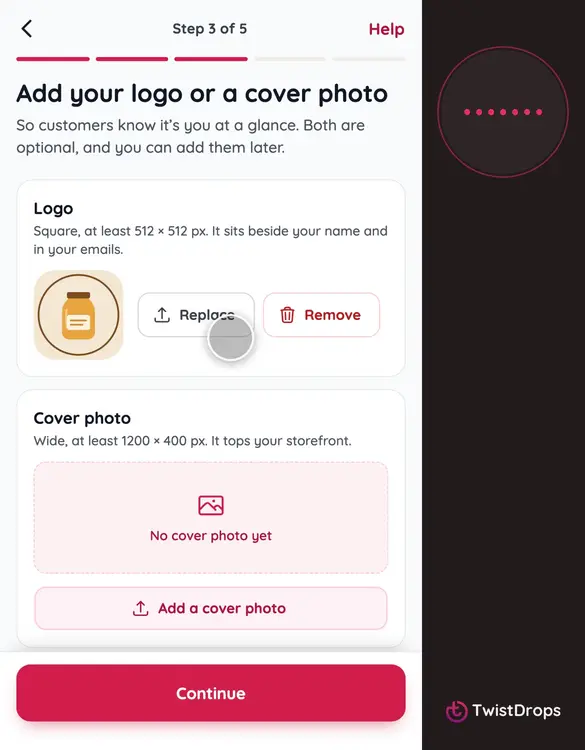
Now your pictures. They are optional, but a logo and a cover photo make your storefront feel like yours.
1:11
Tap Upload a logo, and choose a square picture. It sits beside your name and in your emails.
1:18
Then add a cover photo. It's the wide picture at the top of your storefront. Then tap Continue.
1:25
Now, where is your shop? We've chosen Ireland from your phone, with its currency, euros, and its clock: Dublin time. Every price you set will be in euros.
1:37
Add the phone number customers can reach you on, without the country code: it is already plus three five three. They get it in every email about their reservation.
1:47
If it's on WhatsApp, switch this on, and your storefront shows a WhatsApp button. Then tap Continue.
1:55
Last step: where do customers pick up? Start with the street and number.
2:01
Then the city.
2:04
And the postal code, in the format of Ireland. This address becomes your first pickup point.
2:11
That's everything. Tap Open my shop.
2:14
Your shop is open! This is your storefront link. Tap Copy to share it with your customers.
2:21
Now tap Set up your shop, to go to your Home page.
2:25
This is your Home page. Your shop is open, with its logo and its phone number already done. Next on the list is your story. Tap Write it.
2:36
This is your About page. What you write here shows on your storefront, under your name. Say a few words about you and what you make.
2:50
When you're happy with it, tap Save changes.
2:54
Saved. Tap Home to go back to the list.
2:58
Your story is ticked off. Now, your storefront: the page customers will visit. Tap Open it.
3:06
This is what customers see. Your cover photo, your logo and your name.
3:12
Scroll down, and there is your story, and your pickup point, with a link to directions.
3:18
One more thing. Your country decides your currency. Open Menu, then Settings, and then Details.
3:27
Here is your country, and the currency your prices are in: euros. It is chosen when you open the shop, and it cannot change later.
3:36
That's your shop, ready for customers to find. In the next video, we'll add your first products.
Prev
Playlist
Next