Academy
Open your shop in Spain
Set up your shop · 1 of 6
Hide playlist
Sign in
0:00
/ 3:47
1×
Prev
Next
Transcript
Tap a line to play from there
Click a line to play from there
0:02
Welcome to TwistDrops. In this video you'll create your account, open your shop, tell customers your story, and see your storefront.
0:11
Start with your name.
0:15
Then your email address. It's what you'll sign in with.
0:21
Choose a password of at least six characters, and type it again to be sure.
0:28
Tap Create account. On the real site we first email you a link to confirm your address. In this video, that step is skipped.
0:37
Now your shop. First, choose what you sell. We'll pick Bakery. You can't change this later, so choose the one that fits. Then tap Continue.
0:48
Next, give your shop a name. Customers see it on your storefront, in their emails and on receipts.
0:55
Your storefront link is made from the name, and we check that it's free as you type. Tap Continue.
1:02
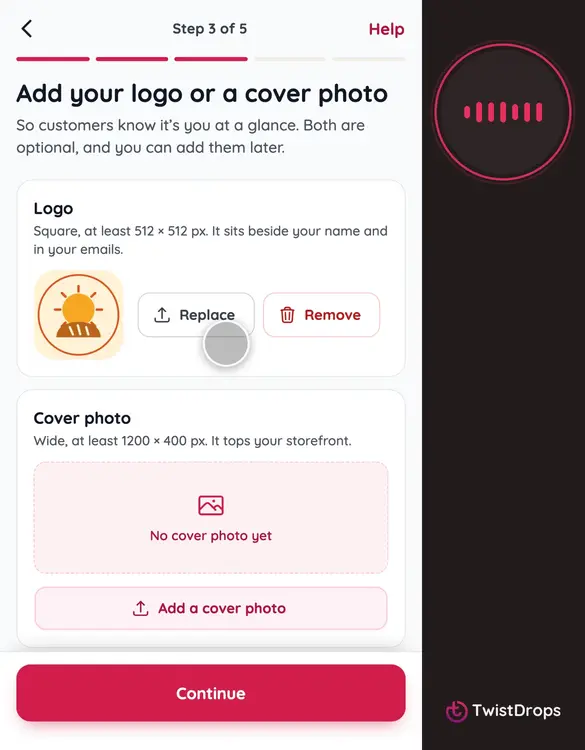
Now your pictures. They are optional, but a logo and a cover photo make your storefront feel like yours.
1:09
Tap Upload a logo, and choose a square picture. It sits beside your name and in your emails.
1:17
Then add a cover photo. It's the wide picture at the top of your storefront. Then tap Continue.
1:24
Now, where is your shop? We've chosen Spain from your phone, with its currency, euros, and its clock: Canary Islands time. Every price you set will be in euros.
1:36
Add the phone number customers can reach you on, without the country code: it is already plus thirty-four. They get it in every email about their reservation.
1:46
If it's on WhatsApp, switch this on, and your storefront shows a WhatsApp button. Then tap Continue.
1:53
Last step: where do customers pick up? Start with the street and number.
2:00
Then the city.
2:04
And the postal code, in the format of Spain. This address becomes your first pickup point.
2:11
That's everything. Tap Open my shop.
2:14
Your shop is open! This is your storefront link. Tap Copy to share it with your customers.
2:21
Now tap Set up your shop, to go to your Home page.
2:25
This is your Home page. Your shop is open, with its logo and its phone number already done. Next on the list is your story. Tap Write it.
2:36
This is your About page. What you write here shows on your storefront, under your name. Write it in your shop's language, here Spanish, and later you can add it in other languages.
2:52
When you're happy with it, tap Save changes.
2:56
Saved. Tap Home to go back to the list.
3:00
Your story is ticked off. Now, your storefront: the page customers will visit. Tap Open it.
3:08
This is what customers see. Your cover photo, your logo and your name.
3:14
Scroll down, and there is your story, and your pickup point, with a link to directions.
3:20
One more thing. Your country decides your currency. Open Menu, then Settings, and then Details.
3:30
Here is your country, and the currency your prices are in: euros. It is chosen when you open the shop, and it cannot change later.
3:39
That's your shop, ready for customers to find. In the next video, we'll add your first products.
Prev
Playlist
Next