Academy
Pickup helpers: someone to hand orders over
Set up your shop · 10 of 14
Hide playlist
Sign in
0:00
/ 1:09
1×
Prev
Next
Transcript
Tap a line to play from there
Click a line to play from there
0:00
Someone else hands orders over on a busy Saturday? Invite them as a helper. They can scan pickup codes, and nothing else. With the Pickup helpers add-on, open Menu, Settings, and tap Pickup helpers.
0:14
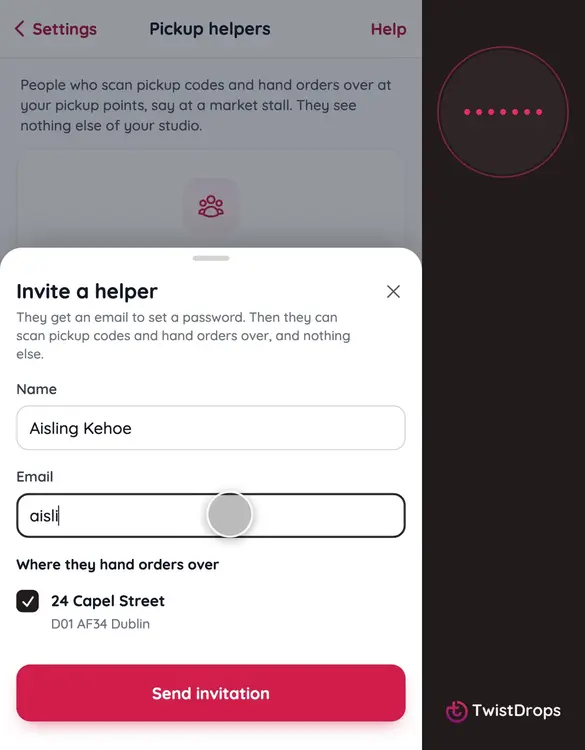
Tap Invite a helper.
0:17
Add their name and email, and tick the pickup points where they help.
0:25
Tap Send invitation.
0:28
You see them here as Invited. You can send the invitation again, or remove them, whenever you like.
0:35
This is what they get: our own email, with a button. The link works for seven days.
0:41
On their phone, a new helper chooses a password, and taps Join.
0:48
Their studio is the scanner, and nothing else. A customer shows their code, and the order comes up.
0:55
They tap Mark picked up. They only see orders collected at their points, and you can see who handed each one over.
1:03
When the Saturday is over, remove them, and their access ends at once.
Prev
Playlist
Next